Throwback
Long before Android, I used to flash Sony Ericsson phones with custom firmware, replacement themes, boot animations, acoustic packs, menu icons. There was no reason for any of it beyond the fact that it was fun for 11-year-old me.
Then came Android, and with it the modding scene on XDA, stepping up the game: CyanogenMod, unlocked bootloaders, root, custom kernels, then jailbreaks on iOS (Cydia, Redsn0w). Back then the stock software was mediocre and we did it to get extra features from a device we owned.
Around the early 2010s phones got good. Stock Android became usable, updates arrived on time, and the features you used to flash a ROM for were added to the stock ROMs. The scene didn't die so much as run out of purpose.
oh how the tables have turned
I've just replaced my daily driver with a current-gen Pixel and flashed GrapheneOS. Not for fun this time and definitely not for extra features - in fact I'm losing features (see which ones below). I'm doing it because, over the next six months, what your phone is actually for is about to change. Content scanning is moving into the operating system itself, which makes it the first version of this you can't block, filter, or route around at the network layer.
The Events
Accurate as of August 2026, but things move fast in this space.
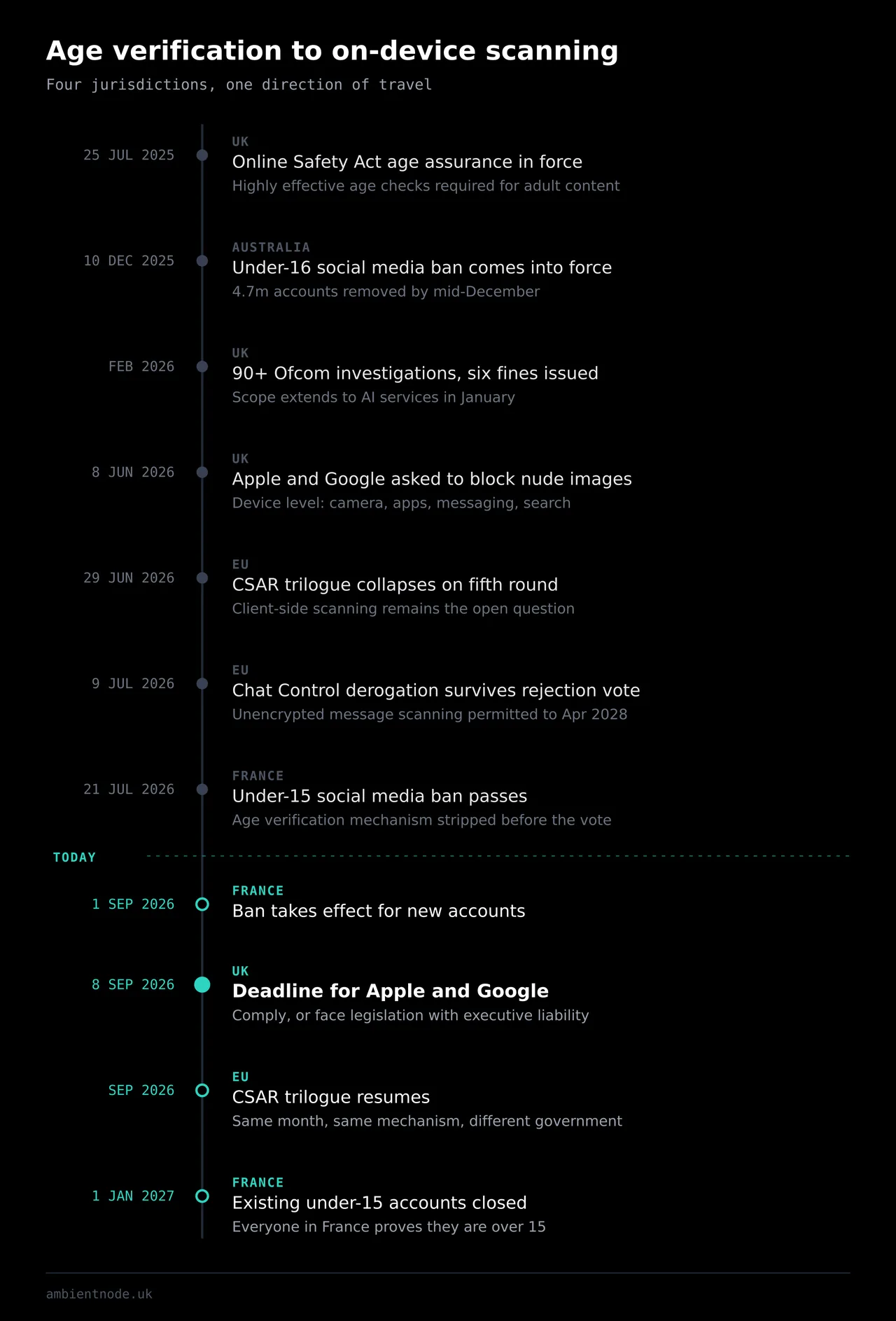
- Australia went first. The under-16 social media ban came into force on 10 December 2025. By mid-December, platforms had removed access to 4.7 million under-16 accounts. By March 2026 the eSafety Commissioner had opened formal investigations into Facebook, Instagram, Snapchat, TikTok and YouTube. Around 70% of Australian under-16s were still reported by their parents as accessing social media after the ban took effect. In June 2026 the government's response was to raise the maximum penalty to A$99 million and grant the regulator power to compel platforms to evidence their compliance. Measure introduced, measure doesn't achieve its stated goal, measure escalated.
- Texas passed the App Store Accountability Act (SB 2420), which makes the app store itself verify the age of every user, not just minors, with under-18 accounts tied to a parent who approves each download. A federal judge blocked it, the Fifth Circuit put the block on hold, but the Supreme Court declined to intervene, so it is being enforced while the challenge continues. Utah and Louisiana have passed their versions of it.
- France passed its version on 21 July 2026; the first EU member state to do so. Under-15s barred from social media, effective 1 September 2026 for new accounts, with existing under-15 accounts to be closed by 1 January 2027. Parliament removed the age-verification mechanism from the law as well as the clause giving Arcom authority to impose measures over non-compliant platforms. Only Article 6-9 remained, which is a single sentence added to the 2004 digital economy law: access to online social network services is prohibited for minors under fifteen. So Meta, TikTok and Snapchat now decide how you prove your age... the companies you're proving it to also choose how the proof happens. From January everyone in France will have to prove they are over 15. A measure aimed at minors resolves, in implementation, to an identity check on every adult.
- The EU's Chat Control: On 9 July 2026, the European Parliament voted on whether to reject the Council's revival of the expired scanning derogation. The rejection failed (despite more MEPs voting for it than against), so scanning of unencrypted messages is permitted until April 2028. This is a voluntary derogation, limited to unencrypted messaging. If you use E2EE, this has no effect on you. What does is CSAR (aka. Chat Control 2.0), currently a proposal. This is a permanent regulation that proposes client-side scanning: inspecting a message on the sender's device before encryption is applied, which means, if it passes, confidentiality is gone. The trilogue resumes in September.
- The UK: Age assurance for adult content has been live since 25 July 2025. By February 2026, Ofcom had opened investigations into more than 90 services and issued six fines, including £800,000 against Kick and £1 million against an adult site operator. In January 2026 it opened investigations into X (over Grok), extending enforcement past the content categories it launched with. Then, on 8 June 2026, the PM asked Apple and Google to implement device-level blocking of nude images. To be clear, this is not within one app, but across the camera, third-party apps, messaging and search. The tech giants were given three months to comply, or face legislation carrying fines and criminal liability for company executives. The deadline is 8 September 2026.
The public response to UK age verification was a VPN sign-up surge (Ofcom has itself acknowledged that VPNs cannot be blocked under the Online Safety Act). Every measure above operates on a network or a platform, but the last one operates on the phone in your hand, at OS level.
Content assessment inside the operating system happens below the network stack, before encryption, on the device, in a process no application you install has visibility into. There is no tunnel that helps, and there is no app that intercepts it, because applications only see what the OS permits them to see. This essentially makes E2EE irrelevant.
Important
Three key points an alternative OS won't mitigate:
- GrapheneOS does not exempt you from the law.
- It cannot do anything about server-side age verification. Websites will still ask for your ID.
- It does not protect the other end of a conversation, so if you message someone on stock Android, client-side scanning would still happen on their end.
What is GrapheneOS?
This post describes how these systems work and what remains available to adults who want to understand the devices they own. It is not an installation guide, it is not instruction on evading age verification, and I'm not covering the flashing process as that is already well documented and straightforward. This is a record of what a hardened OS costs you, its upsides and inevitable downsides.
Back in the day, flashing required unlocking the bootloader and leaving it unlocked, meaning anyone who picked up your phone could compromise it. We gave up security to get control.
GrapheneOS works differently as it relocks your bootloader: unlock > flash > enrol your own signing keys > relock. Verified boot then runs as designed, validating the boot chain cryptographically on every start against keys you control. To be clear, GrapheneOS is not a custom ROM in the old sense. It is an independently built and maintained OS based on the Android Open Source Project with Google's additions removed and a lot of hardening added: hardened memory allocator, hardened kernel, exploit mitigations that kill entire bug classes instead of targeting individual CVEs. No Google services at all by default and you get a number of permissions stock Android does not give you:
- Network permission: Completely revoke it per app.
- Sensors permission: One toggle covering accelerometer, gyroscope, compass, barometer. Stock Android lets apps read these with no prompt.
- Storage and contact scopes: An app gets access to specific files or specific contacts while believing it has access to everything.
- Auto-reboot: After a set idle period the device returns to its before-first-unlock state, getting disk encryption keys out of memory.
- Duress PIN (enter it and the phone wipes immediately without confirmation or warning, so be careful using it), USB-C port control, PIN scrambling, second factor login (fingerprint + PIN).
You can install Google Play, if you want to, although it is less of a choice as a lot of modern apps need it for integrity checks. It runs as a normal sandboxed app with no special privileges. You can run this in a separate profile, so Play Services are not interfering with your main profile. On stock Android, Play Services is a privileged core component with access most apps could never request. Which is why an OS-level content scanner can't be pushed down into it. An unprivileged app has no route into your camera pipeline or your media store.
As the device is not running Google's build of Android and you use your own keys, it is no longer a Google-signed device as far as attestation is concerned. This comes with trade-offs (especially to convenience), covered in the next section.
Trade-offs
First, GrapheneOS only runs on Google Pixel devices. The reason is bootloader relocking; almost every other manufacturer either blocks it or only allows relocking against their own key, so a different OS means running permanently without verified boot. Pixels allow a custom root of trust, so you enrol your own keys, relock, and keep the boot chain validated. Funny enough, to get away from Google's OS, you have to buy Google's hardware.
GrapheneOS partnered with Motorola earlier this year, so from 2027, some Motorola flagships should be supported. As much as I prefer stock Android, I was never drawn to Pixels. Always thought they looked like the quintessential "phone". I've been on Nothing phones for the past four years, so the visual change was dramatic.
Arguably more important, you lose out on:
- Contactless payments with Google Wallet: Google Wallet tap-to-pay needs privileged secure element access GrapheneOS doesn't grant. Even though Google Wallet does not, Curve works for NFC payments. You can also get WearOS with Wallet set up, so you don't need to carry physical cards around.
- Pixel's AI features: Call Screen, Scam Detection, Now Playing, Live Translate, the Recorder transcription, Gemini integration. These are Google app features tied to privileged system components. There are some F-Droid alternatives you can use for call screening, but of course Google's all-in-one AI features are more sophisticated.
- Google backup and restore: No seamless transfer from another Android phone, so no Google One backup, no Find Hub. Migration is manual and the ongoing backup is up to you. This is not really an issue if you self-host, but you do need to remember to reflash stock before resale.
- Push notification friction. Apps depending on Firebase Cloud Messaging only get push if sandboxed Play is installed in the same profile. If Play runs in a separate profile for isolation, you trade away timely notifications in that profile.
- Nothing is stable: You are pretty much one app update away from a broken app, if a developer tightens their integrity check, you won't get a warning and an app can just break.
App Compatibility
Everything below was tested on GrapheneOS build 2026071501, with sandboxed Google Play installed in a separate second profile, tested over a week. Play Integrity baseline for the device passes basic integrity, fails device integrity and strong integrity. Some apps install only through sandboxed Google Play. Others work from Aurora Store, F-Droid, or a directly sideloaded APK. Some need Exploit protection compatibility mode enabled to run. Some refuse Log in with Google and require a direct username/password instead.
Connectivity
Everything works as expected. I especially like the option to disable BT/WiFi after 5+ minutes of it being disconnected.
| Feature | Result |
|---|---|
| eSIM provisioning | Works |
| VoLTE | Works |
| VoWiFi / WiFi calling | Works |
| 5G | Works |
| Bluetooth | Works |
Banking and finance
| App | Result | Notes |
|---|---|---|
| Monzo | Works | |
| Starling | Works | |
| Revolut | Works | |
| Nationwide | Works | |
| Amex | Works | |
| Chase UK | Works | |
| NatWest | Works | |
| Santander | Works | Disable secure app spawning |
| Klarna | Works | |
| PayPal | Works | |
| Trading 212 | Works | |
| Barclays | Fails | |
| HSBC | Fails | |
| Lloyds | Fails | |
| Halifax | Fails | Browser PWA works, but re-authenticates every visit |
Payments
| Method | Result |
|---|---|
| Google Wallet tap-to-pay | Does not work, and never will |
| Curve (contactless) | Curve works for NFC payments, more info here. |
| Wear OS + Wallet on watch | Works, but I had to pair the watch with a non-GrapheneOS phone first for Wallet. |
Government and identity
| App | Result | Notes |
|---|---|---|
| NHS App | Works | Login and prescriptions both fine |
| HMRC | Works | Complains Vanadium is incompatible; set default browser to Firefox and it proceeds |
| GOV.UK One Login | Fails | |
| GOV.UK | Fails |
Transport and ticketing
| App | Result |
|---|---|
| Trainline | Works |
| National Rail | Works |
| TfL | Works |
| BA / easyJet / Ryanair | Works |
| Uber | Works (Aurora) |
| Ticketmaster | Works |
Media
| App | Result |
|---|---|
| Netflix | Works |
| Disney+ | Works |
| BBC iPlayer | Works |
| Spotify | Works |
| Jellyfin | Works |
Daily driver
| App | Result | Notes |
|---|---|---|
| Signal / Molly | Works | |
| Works | ||
| Home Assistant | Works | Notifications and location tracking fine |
| Aurora Store / F-Droid | Works | Play alternative / FOSS store |
| YouTube / YT Music / SoundCloud | Works | SoundCloud gave me an error on launch, but continued working without an issue. |
| Pixel Camera | Works | Sideloaded for the extra features |
| eBay | Works | Sideloaded APK only; not from Play or Aurora |
| Works | Needs Play install with integrity blocked, so no Google login, username/password only |
Conclusion
The device works, contactless works, transport and media work. I gave up Wallet and the Pixel AI features, and the convenience of things Just Working™, but in return I have a secure and locked down device. You should be able to decide for yourself if that trade is worth it, as it depends on what you do and who you bank with. But the window to decide is closing, and once age assurance runs through attestation it won't be much of a choice.
Twenty years ago I flashed phones to make them do more. Now it is to keep one from doing something. Such is the circle of life.