Amass is an open-source attack surface mapping tool maintained under the OWASP (Open Web Application Security Project) umbrella. It's designed to help security teams and researchers enumerate an organisation's external footprint by aggregating data from a wide range of public sources, such as DNS records, certificate transparency logs, Shodan, AlienVault OTX, and dozens of other passive intel feeds.
This is a passive scanner in its default mode, meaning Amass doesn't send packets to your target. It's purely OSINT, reading public records that already exist about your domain and infrastructure.
What Can Amass Actually Find?
For a something like homelab with a public domain, Amass can surface:
- Subdomains: anything in DNS or associated with a TLS certificate. If you've ever pointed
gatus.yourdomain.comat your home IP and issued a Let's Encrypt cert for it, Amass will find it. - Certificate transparency history: every cert ever issued for your domain is permanently logged in public CT logs. This is basically a changelog of every service you've ever publicly exposed, even ones you've since taken down.
- IP associations: which IPs your subdomains resolve to, including historical resolution data.
- ASN and hosting fingerprinting: whether your services are behind Cloudflare, on a VPS, or resolving directly to a residential ISP block (which in case of a homelab would be your home IP).
- DNS infrastructure: MX records, nameservers, SPF/DKIM TXT records, CNAMEs.
- Third-party data source correlations: if your IPs appear in Shodan, AlienVault, or similar threat intel databases, Amass will link that up.
What it won't tell you is what's actually running on the exposed ports. that's a job for nmap and the mapping would happen further down the line. You can think of Amass as the reconnaissance layer that tells you what to look at, and nmap as the layer that tells you what's there.
Installation
Option 1: Local Binary
If you're doing a one-off audit, you can install the binary with:
curl -LO https://github.com/owasp-amass/amass/releases/download/v5.1.1/amass_linux_amd64.tar.gz
tar xfz amass_linux_amd64.tar.gz
sudo mv amass_linux_amd64/amass /usr/local/bin/
amass --version
Verify it's working with a quick passive scan:
amass enum -passive -d example.com
Option 2: Docker
Docker makes more sense if you want this running on a regular schedule on a Proxmox VM, for example, as a weekly cron job that diffs results and alerts you to new exposure.
docker pull caffix/amass
Run a scan with a persistent config volume:
docker run -v ~/amass:/root/.config/amass caffix/amass enum -passive -d yourdomain.com
The volume mount at ~/amass gives you persistent configuration and output between runs. Create a config.yaml there if you want to add API keys (more on that below).
Docker Compose
services:
  amass:
    image: caffix/amass
    volumes:
      - ./amass-config:/root/.config/amass
      - ./amass-output:/output
    command: enum -passive -d yourdomain.com -json /output/latest.json
To set up a rigger it from a cron job or a simple shell script that handles the diff:
#!/bin/bash
DATE=$(date +%F)
PREV=$(ls -t ~/amass-output/*.json 2>/dev/null | sed -n '2p')
CURR=~/amass-output/$DATE.json

docker run -v ~/amass-config:/root/.config/amass \
           -v ~/amass-output:/output \
           caffix/amass enum -passive -d yourdomain.com -json /output/$DATE.json

if [ -f "$PREV" ]; then
  echo "=== New subdomains since last scan ==="
  diff <(jq -r '.name' $PREV | sort) <(jq -r '.name' $CURR | sort) | grep '^>'
fi
Adding API Keys
Without API keys, Amass relies on open sources only. With them it gets access to a lot more data it can use for cross-referencing against threat intel databases and historical DNS data that passive DNS and CT logs on their own won't surface.
There are a number of third party sources you can integrate, but for this example, we'll focus on two free-tier options, AlienVault OTX and Shodan.
API keys are configured via a datasources.yaml file. The binary has a template with every supported source already listed, so you can copy it into your Amass config directory and fill in your API keys:
mkdir -p ~/.config/amass
cp ~/amass_linux_amd64/resources/datasources.yaml ~/.config/amass/datasources.yaml
nano ~/.config/amass/datasources.yaml
Find the AlienVault and Shodan entries in the file and add your keys:
- name: AlienVault
  creds:
    - apikey: YOUR_OTX_KEY_HERE

- name: Shodan
  creds:
    - apikey: YOUR_SHODAN_KEY_HERE
Amass automatically picks up the config from ~/.config/amass/ on the next run. For Docker, mount the config directory as a volume:
docker run -v ~/.config/amass:/root/.config/amass caffix/amass enum -passive -d yourdomain.com
Running A Scan
Amass splits the process into two steps, first the scan, second the query. The enum subcommand runs the enumeration and stores everything in a local OAM database. The subs subcommand then queries that database to display results. They're separate on purpose, which means you can re-query the same scan data multiple ways without re-running the scan.
Step 1: Run the enumeration:
amass enum -passive -d ambientnode.uk

For a more thorough active scan (sends DNS queries directly, this is detectable, so only use on domains you own):
amass enum -active -d ambientnode.uk

The difference is that passive mode only queries public data sources. Active mode also sends DNS queries directly to nameservers, which is more thorough but leaves traces in DNS logs.
Step 2: Query the results:
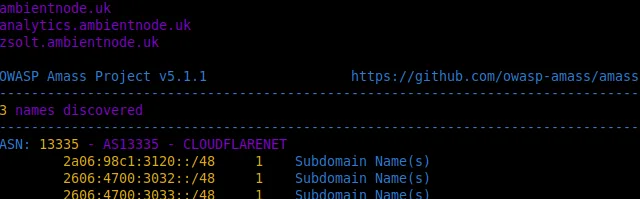
amass subs -show -d ambientnode.uk
With IP resolution:
amass subs -show -d ambientnode.uk -ip
Just the names, no formatting:
amass subs -show -d ambientnode.uk -names
ASN summary only:
amass subs -show -d ambientnode.uk -summary
Save output to a file:
amass subs -show -d ambientnode.uk -ip -o results.txt
Running a full passive enumeration against ambientnode.uk produced:
ambientnode.uk  2a06:98c1:3120::4
--------------------------------------------------------------------------------
1 names discovered
--------------------------------------------------------------------------------
ASN: 13335 - AS13335 - CLOUDFLARENET
    2a06:98c1:3120::/48    1    Subdomain Name(s)
Even though this feels a bit underwhelming, it's the best possible outcome. The root domain ambientnode.uk resolving to 2a06:98c1:3120::4 which is a Cloudflare IPv6 address within CLOUDFLARENET.
Against a Real Target
Tesla operates a public bug bounty programme and explicitly permits passive recon, so it's an ideal legal target to show the tool's capabilities.
amass enum -passive -d tesla.com
amass subs -show -d tesla.com -ip
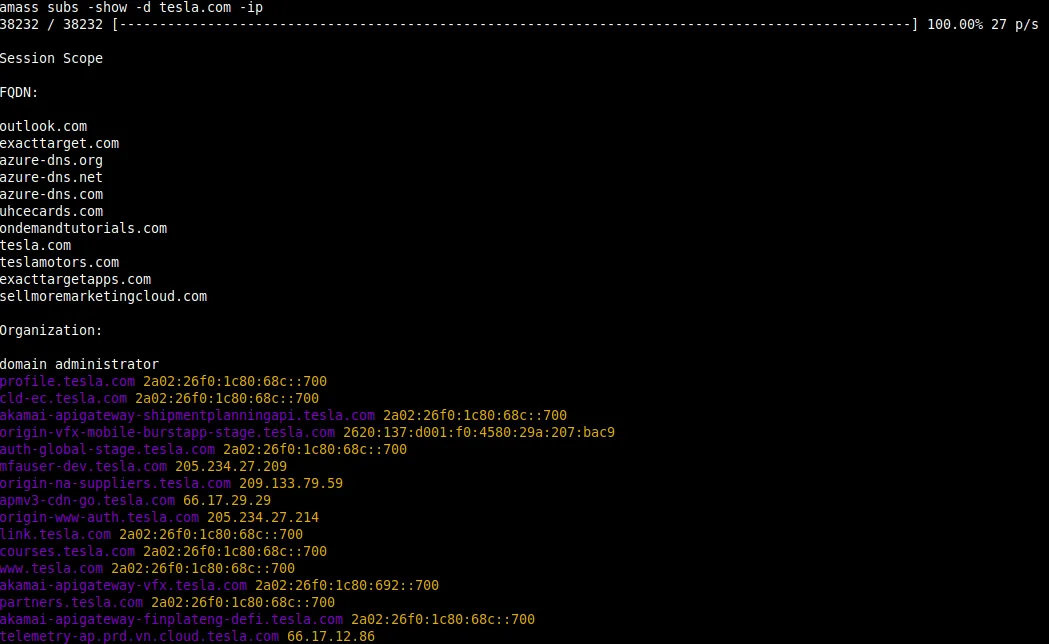 This came back with 179 subdomains discovered across 38,232 data source queries.
You can see a clear internal naming convention across their infrastructure with akamai-apigateway-* prefixes indicating API gateway endpoints managed through Akamai, and staging and production variants side by side in public DNS. Mfauser-dev.tesla.com and mfamobile-dev.tesla.com both resolve to a real IP, meaning their MFA development environment is publicly reachable.
Takeaways
Running Amass against your own domain is a useful exercise because it shows you what an attacker sees before they've done anything active. Services you set up years ago and forgot about are still documented there.
For a homelab that iterates quickly (new services, subdomains, etc), a weekly passive scan could give you a basic audit trail of your own exposure over time.