I needed to register a batch of devices in GLPI from a CSV and didn't want to do it by hand. GLPI has a plugin that allows you to import data, but I found multiple issues with using GLPI plugins due to version updates and trying to limit the number of plugins I use.
The GLPI API is comprehensive, so decided to use that instead. Here's the n8n workflow I used with a form, making uploading data is even simpler.
The workflow looks each value up by name, creates it if it's missing, and caches the results:
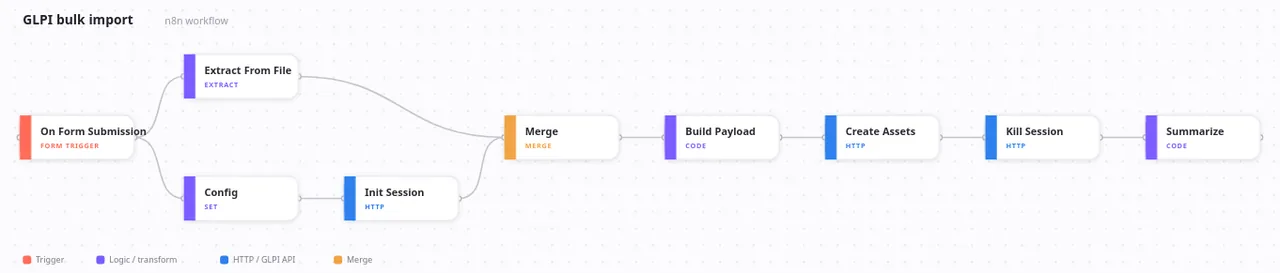
The nodes
- On Form Submission: serves the upload form, accepts one CSV.
- Extract From File: parses it into one item per row.
- Config: GLPI URL, App-Token, user token, itemtype, entity ID.
- Init Session: logs in, returns a session token.
- Merge: waits for the file and the session before continuing.
- Build Payload: maps columns to GLPI fields, resolves dropdown names to IDs (creating any that are missing), builds the
inputarray. - Create Assets: one POST that creates the whole batch.
- Kill Session: closes the session.
- Summarize: counts what went in, shown on the form's completion screen.
Setup
- Fill in the Config node.
- The form's file field is
CSV File, so its binary comes through asCSV_Filethat's what Extract From File reads. - For phones/tablets, set
itemtypetoPhoneand point the model/type dropdowns atPhoneModel/PhoneType.