I started mapping out my family around six years ago as an ad-hoc project. I don't personally know many family members beyond my closest relatives, so even getting started was a challenge. This project can become an extreme time sink and can be stressful at times. There is an overwhelming amount of information in archives and databases that you need to correlate somehow, while everyone who could help you is dead. It is also not a one-and-done project, and every family tree is different, so this post is meant as a starting point for your own investigation and a description of the tools I used.
This is very different from my Maltego post. We are mostly looking for dead relatives, which means scans of birth, death and marriage records, archives and letters that may or may not have been OCR'd or manually transcribed.
Start with the living
The first step was to organise sit-down sessions with "the greats". These are the elderly family members from different branches of my family, with a lot of knowledge about family relationships, mostly within their own branch. They helped me map out the members they knew of: names, approximate dates, spouses and children. This should absolutely be your first step. Document as much as you can from living relatives while you still can, because that information is lost with them.
The greats can only remember so much, and you don't want to rely fully on a single elderly person's memory, so a lot of dates become estimates. You also can't realistically expect them to know about other branches. They may know some of their direct ancestors, but most of the help they can give is east-west: cousins, siblings and their descendants.
The bigger problem is a branch with no living relatives at all, or where the living ones are too young to know anything. Once the memories are documented, you should have a solid foundation and a fairly accurate picture of your close family. Then the next steps come in.
Standard Tools and Expectations
- MyHeritage: I started my tree on MyHeritage years ago, so that's what I used. This is not an advertisement for them, and I haven't tried any other platform. Whichever platform you use, you will most likely want to pay for the paywalled features: Smart Matches to other family trees, record matches and the research functionality. There is no point working around this with OSINT, as many of the answers are right there behind the paywall. Exhaust all Smart Matches, review every possible match and family tree connection carefully, and correlate the data until you either hit a wall or run out of scanned records.
- MyHeritage also lets you export your tree as a GEDCOM file (Family Tree > Export tree to GEDCOM). GEDCOM is a standard plain text format for storing and transferring genealogical data, such as names, dates, places and family relationships, between different family history programs and websites. I'll cover why this is important later.
- FamilySearch: An invaluable source of books, records and scanned images.
- FamilySearch centres: Some documents and records on FamilySearch are restricted and can only be viewed at their official research centres and libraries. These are usually appointment only.
- Town halls and government offices: Some of the more recent documents are restricted even at FamilySearch centres. As a direct descendant of the person you are researching, you have the right to request their birth, marriage and death records, for a fee.
- DNA research: GEDmatch is a free service where you upload the raw DNA data file from a testing company (Ancestry, 23andMe, MyHeritage, FamilyTreeDNA and so on) and compare it against people who tested with other companies. It widens your match pool beyond a single vendor's database.
Beyond transcriptions
Eventually you run out of oral history and transcribed records. In my case I found a large number of town and parish church archives that were scanned but never transcribed. They are written in a mix of languages, including Latin, and are entirely handwritten. Some pages are missing, some are smudged, and so on.
This is a lifelong hobby for many people, and I want to stay respectful and not undermine the manual route, but I don't want to spend half my life searching through old records by hand.
I normally exclude the trial and error parts of my research posts to make it easier to digest, but on this occasion I have jumped through many hoops to get this working and I am documenting the failure points too.
AI
AI is extremely useful for correlating data and making sense of the large datasets you will be dealing with. However, and this is very important, do NOT treat AI as your only source of truth. Verify every source it gives you and confirm every finding manually before adding anything to your family tree. You will also need an AI agent that can do research with web searches and connect to MCP servers where needed. I used Claude Fable 5.1 Max for both the initial testing and the transcription later on.
To test its capabilities, I gave it handwritten Latin pages that I struggled to even make out. To my surprise, Claude transcribed them without any issues. I had it transcribe about 20 pages of mixed birth, death and marriage records, then verified them manually.
During the first round of research, I found a huge amount of scanned books (final figures below), that is far more than fits in a standard Claude chat's context window, so I used the API. Before any processing, though, the books had to be downloaded.
Downloading the books
FamilySearch provides the books and registers, but you can only view and download them page by page, which takes absolutely ages. Their terms of use don't allow bulk downloading, so check them before planning how you'll approach this part, I cannot advise on this.
Once downloaded, each book is organised by its book ID so I know where it came from, and zipped into a single file. I repeated this a number of times until all publicly available records were downloaded. This stage took about a week of downloading, resulting in a total of:
- 62 books
- 49600 pages with 15-30 entries on each page
- 30 GB of data
To put this into perspective, the average person can transcribe around 8 to 16 pages of books written in cursive, in an older language, in a single day. It would take 8.5 years of non-stop transcribing to go through it.
Once everything was downloaded and organised, it was time to build the pipeline.
Why a pipeline?
Transcribing 20 pages in a chat window works fine as a test, but when it comes to 60+ books and thousands of pages, it just won't work. A chat has a limited context window, so you would be feeding pages in a few at a time over thousands of conversations. Each conversation starts with no knowledge of the previous one, so the model would need to relearn each book's layout, language and abbreviations every time, and the output format would drift between sessions. You would end up with millions of loose transcriptions in chat history that you can't search, query or trace back to the page they came from.
The goal wasn't to transcribe the whole thing but to find my relatives in these records, which means comparing every transcribed entry against every person in my family tree, including the spelling variants and Latinised names used by the officials/priests etc. This only works if the records are structured data in a database, not text in a chat.
So the requirements were:
- Scale: Process every page at high volume without manual copy and paste.
- Consistency: Every page in a book is read with the same instructions and returns the same structure.
- Cost: At this volume, the price per page matters and my original £1000 budget for this project would be out the window real quick.
- Traceability: Every record can be traced back to its exact scan so it can be verified.
- Queryability: The results can be searched and correlated against the GEDCOM export.
Each stage of the pipeline below covers one or more of these.
Record Transcription Pipeline
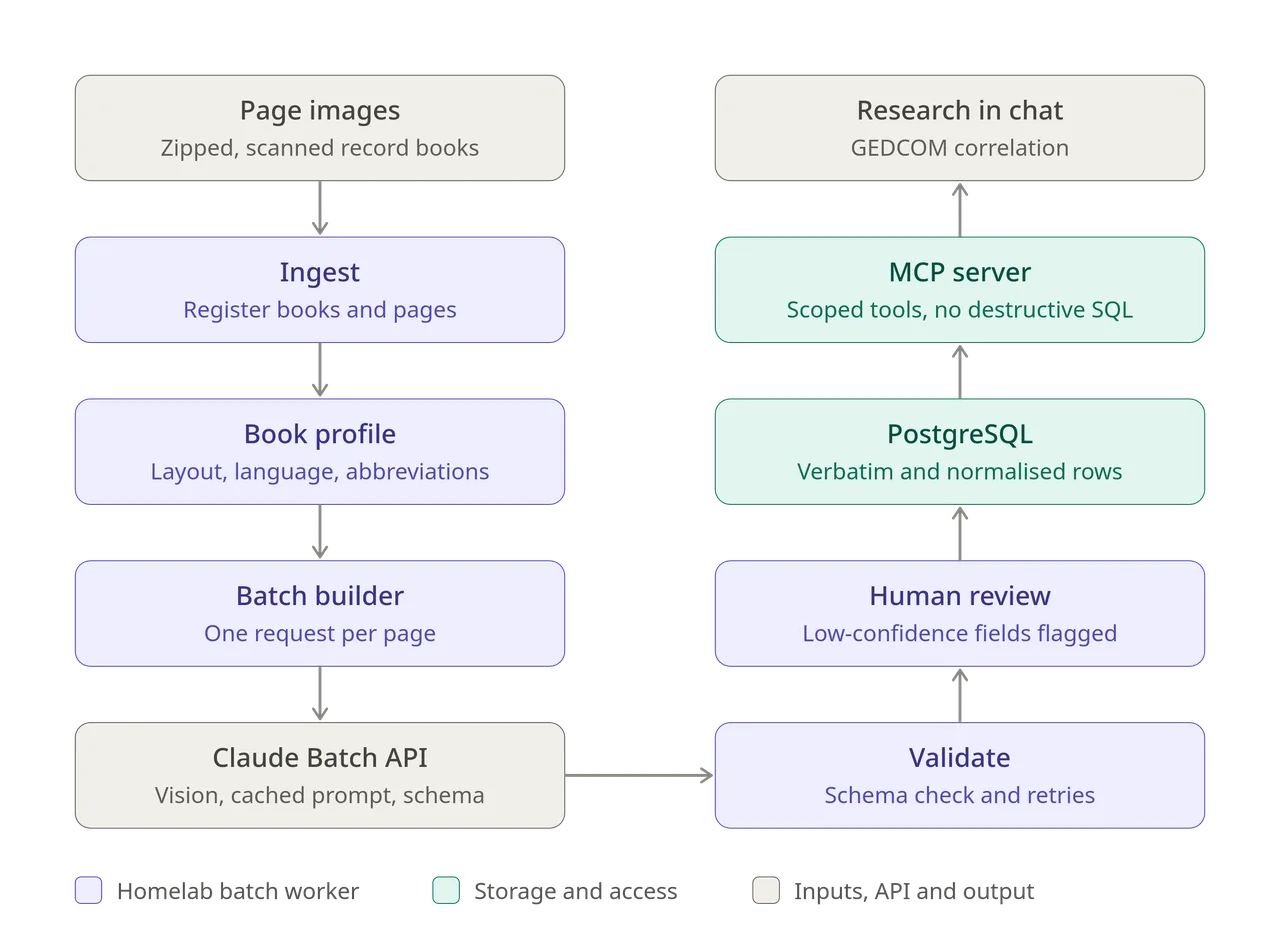
- Page images: The scanned books are stored as zipped folders of page images. The originals are kept untouched and everything downstream works from copies.
- Ingest: Each book is unpacked and registered in the database with its record type and year range. Every page gets an ID, file path and hash, so any transcribed row can be traced back to its exact scan.
- Book profile: Before bulk processing, a short profile is written for each book from a handful of sample pages. It covers the column layout, the language (usually Latin, Hungarian or German) and the abbreviations the clerk used. The profile is reused for every page in that book.
- Batch builder: The worker creates one API request per page, combining fixed transcription instructions, the book profile and the page image. The response is forced into a JSON schema covering event type, date, names by role, ages, residence and a confidence score for each field.
- Claude Batch API: Requests are submitted as asynchronous batches, which cost half the standard price. The shared instructions and book profile are prompt cached, so only the image changes between requests.
- Validate: Results are checked against the schema. Failed or missing responses are queued for retry. Every row records which prompt version produced it, so books can be reprocessed when the instructions improve.
- Human review: Fields below a confidence threshold are flagged and checked against the original image before a record is marked as verified.
- PostgreSQL: Each name is stored twice: exactly as written in the register, and in a normalised modern form in a separate column. Fuzzy matching extensions handle spelling variants and Latinised first names.
- MCP server: The database is never exposed directly. A small MCP server sits in front of it with purpose-built tools for inserting records, fuzzy person search and read-only queries. It runs under a database role that cannot drop or truncate tables.
Pivoting
The pipeline above is what I planned, and most of it was built and used as described. It transcribed a few thousand records across 5 books, and the quality was excellent. But the cost of running it on every book started becoming very expensive, so I had to pivot from the original plan. As all the output of the model was captured and organised in the database, I decided to train my own model based on the existing data.
This required a new flow:
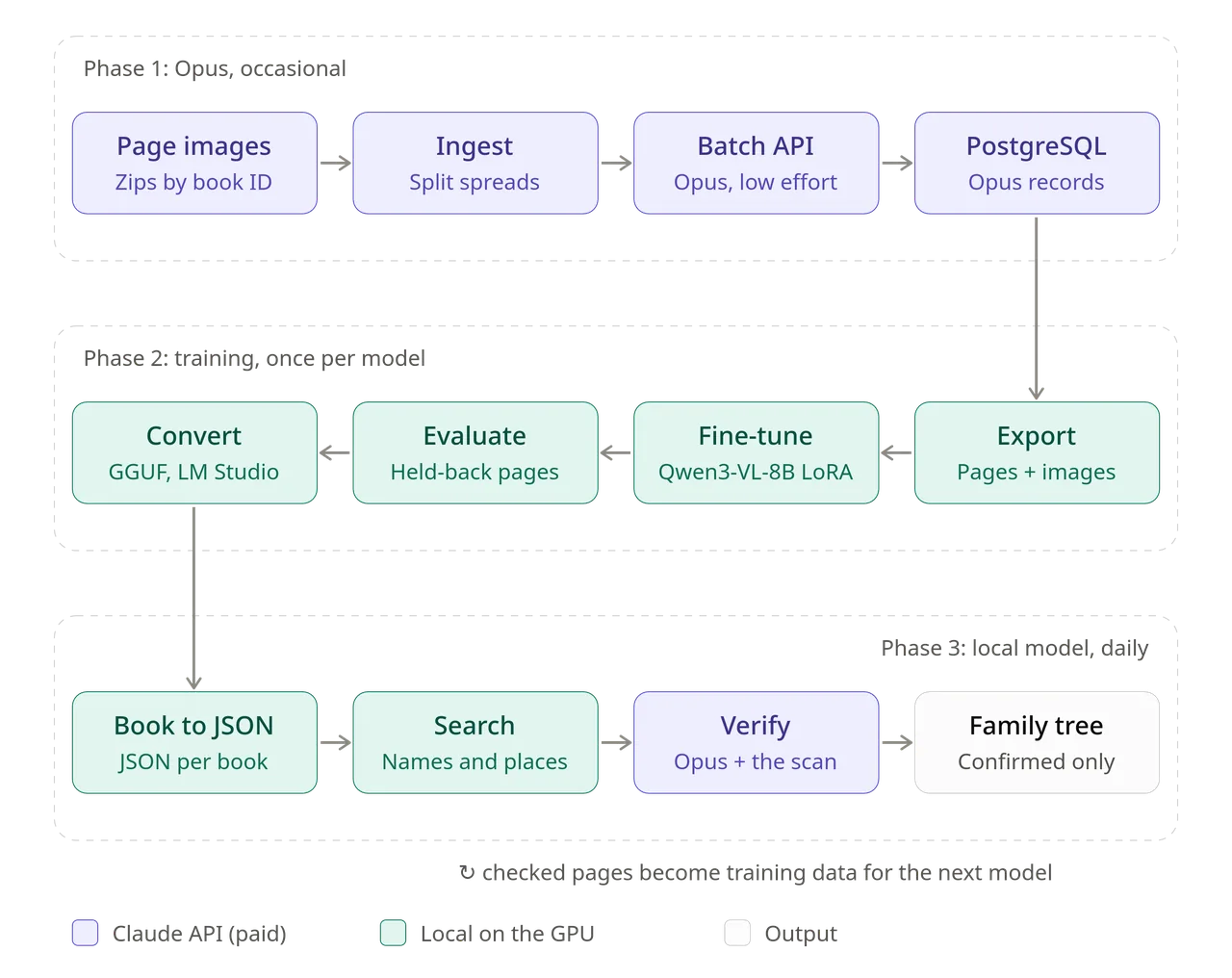
The work is split into three phases. The Opus pipeline runs occasionally, on a small number of pages, to produce accurate transcriptions. Those transcriptions train a local model, and the local model does the bulk work for free.
Phase 1: Opus (occasional)
- Page images: Zipped books named by book ID with the originals backed up.
- Ingest: Each book is registered in PostgreSQL with a hash per page. Two-page scans are separated into individual pages at the highest resolution the model accepts.
- Claude Batch API: Every page is classified and transcribed by Claude Opus 5.5 (which was just released at the time so I swapped Fable with it), returning structured JSON through a tool call.
- PostgreSQL: Names are stored as written and normalised, with fuzzy matching, review flags and the raw response for every page.
Phase 2: training (once per model version)
- Export: Every Opus-transcribed page and its image become one training example. 50 pages are held back for testing.
- Fine-tune: Qwen3-VL-8B is trained with LoRA on an RTX 3090 through Unsloth in WSL2. The second run took about 22 hours.
- Evaluate: The trained model transcribes the 50 held-back pages, and every name, date and residence is scored against Opus.
- Convert: The adapter is merged into the base model and converted to GGUF for LM Studio: an 8.2 GB model file and a 1.1 GB vision file.
Phase 3: local (daily)
- Book to JSON: One script reads each zipped book, sends every page to the local model in LM Studio and writes one JSON file per book. About 60 seconds a page.
- Search: The JSON files are searched loosely by surname, given name and place to find candidate pages.
- Verify: Matching pages go back through Opus, and every finding is checked against the scan before it goes into the family tree.
- Retrain: Verified pages become training data for the next model version, so it improves on handwriting it has not seen before.
Building the database
The first thing I set up was a PostgreSQL database in Docker on a small Linux server in my homelab. It holds every book, page, API call and transcribed record, so it is the backbone of everything that follows. Even though I later moved away from it for day-to-day use, it is where the training data for my own model came from, so set it up properly. The server itself is modest with just 2 CPU cores and 4 GB of RAM. The database does not need more than that. It only stores text and file paths; the page images are on disk next to it.
PostgreSQL
Hungarian registers spell the same name in many ways. A clerk in the 1850s writes a name in Latin, a clerk in 1900 writes it in Hungarian, and both of them spell it however it sounded to them. PostgreSQL has three extensions that deal with this well:
- pg_trgm compares strings by overlapping three-letter chunks, so a search for one spelling also finds close variants of it.
- fuzzystrmatch adds phonetic and edit-distance matching.
- unaccent strips accents, so "Janos" matches "János".
The database stores every name twice; once exactly as written in the register, and a second time in a normalised modern form. The written form is the evidence and is never changed. The normalised form is what you search on.
Security
Two db roles:
- An admin role that owns the schema and runs migrations.
- An app role that the scripts use. It can read, insert and update, but it cannot delete, drop or truncate. A bug in a script can mark rows as wrong, but it cannot wipe months of transcription.
The port is bound to localhost only and the database is not exposed to the internet.
The schema
Six tables in the records schema:
| Table | One row per | What it holds |
|---|---|---|
books |
Scanned book | The FamilySearch book ID, optional title, place, years, languages |
pages |
Page image | Page number, file path, SHA-256 hash, and what the page turned out to be (register, index, blank, cover), its record types, language, legibility and the register's place |
transcription_runs |
API call | Model, prompt version, batch ID, token counts and the full raw response, so results can be re-parsed later without paying again |
events |
Register entry | Event type, event date, secondary date, registration date, date as written, remarks, confidence and review status |
participants |
Person in an entry | Role (child, father, mother, godparent, witness, midwife, registrar and so on), names as written and normalised, age, residence, house number, occupation, religion, legitimacy, and which fields the model was unsure about |
schema_migrations |
Schema change | A history of every migration applied |
The participants table has two generated columns, surname_key and given_key. They are the lowercase, accent-free version of each name, with trigram indexes on them. PostgreSQL automatically fills these in on every insert.
The setup files are in the download section below and include the docker-compose.yml, init/01-init.sh and the four migrations, 001_initial_schema.sql to 004_place_and_registration.sql. Setting it up is:
- Create the folders and a
.envfile with two generated passwords. - Add the init script, which enables the extensions and creates the app role.
- Start the container with
docker compose up -d. - Apply the migrations in order with
psql.
The init script only runs the first time the container starts with an empty data folder, so if you get it wrong, stop the container, empty the data folder and start again.
The transcription script
One Python script, ingest.py, takes a zipped book and does everything: registers it, sends every page to Claude, waits for the results and stores them. You point it at a zip and it runs until the book is done.
python ingest.py 004XXXXXX.zip
The book ID is taken from the zip's file name, so I name every download after its FamilySearch book ID. That ID is all I need to find the original book again later.
Book workflow:
- Ingest. The zip is unpacked into a temporary folder. Every image is hashed, copied untouched into an
originalsfolder, and registered in thepagestable. A duplicate image (same hash) is skipped. - Working copies. Each page gets a resized copy for the API. Two-page spreads also get a left half and a right half, with a 4% overlap in the middle so no word is cut in two.
- Batch. Every untranscribed page becomes one request in the Message Batches API.
- Wait. The script checks the batch every minute.
- Store. Each result is validated and written to
eventsandparticipants, and uncertain entries are flagged for review.
The script is resumable. If you stop it, or the machine reboots, running the same command again skips everything already done and collects any batch that was still running instead of paying for it twice.
My original plan had a "book profile" step: describe each book's layout, language and abbreviations once, then reuse it for every page. This caused an issue as almost all digitised books contained several physical registers filmed one after another, so a single scan can move from Latin baptisms to Hungarian deaths to marriages halfway through.
So every page is treated as independent. For each page the model first classifies it (register, index, title page, blank, narrative), lists the record types on it, the language, the legibility and the column headings, and only then transcribes the entries.
The Message Batches API
Batches cost half the normal API price. The trade-off is that results come back asynchronously, usually within minutes for a small book and within a few hours for a large one, but for transcription that does not matter.
I specified two things for batching:
- Prompt caching: The instructions are identical for every page, so they are cached. Only the image changes between requests.
- Batch size: A batch is limited to 256 MB. With two high-resolution images per page, 200 pages will not fit, so the script fills each batch by size (capped at 180 MB) and sends a large book as several batches. An 886-page book resulted in 19 batches.
Image resolution
This made the biggest difference to accuracy. Each Claude model has a maximum image size it reads at and anything larger is scaled down before the model can see it. For the models I used, that is 2,576 pixels wide.
My scans are two-page spreads about 4,400 pixels wide. Scaled down as a whole, each page of handwriting ended up around 1,100 pixels wide. At that resolution, the model got the surnames wrong and due to its nature, the LLM started hallucinating random names. When I used the full resolution at about 1,650 pixels per page, the transcription came back fully correct. Sending the original 4,400-pixel scans does not help. They are scaled down during ingestion anyway, and they make each request bigger for no gain. The script sizes each working copy to the largest resolution the model will accept.
The prompt
The prompt went through five versions. Every version is recorded against each API run, so a book can be re-run when the instructions improve. The most important ones are:
- Two forms of every name. Exactly as written, including Latin forms and old spellings, and a modern Hungarian form (Joannes to János, Elisabetha to Erzsébet) in a separate field.
- Read letter by letter. Never replace a written name with a more common name that looks similar. This rule exists because a model will happily turn a rare name into a common one.
- Never guess. If a field cannot be read, leave it empty and list it in
uncertain_fields. Unreadable letters are marked[?]. - Never infer relationships. If no father is named, do not create one.
- Child surnames. Birth registers often do not write the child's surname. The model leaves the written field empty and puts the father's surname (or the mother's if no father is recorded) in the normalised field, with a note saying which. Without this, children cannot be searched by surname.
- Shared residence. When one residence is written once for both parents, record it for both. Without this rule the model read the same word twice and got a different place for each parent.
- Later annotations. Registries have columns for notes, and Latin margin notes often record a later marriage or death. They are transcribed in full.
- Register place copied exactly. When a page header was faint, the model filled in a real place name that looked similar, in one case a town in another county. The final prompt makes it copy the place letter by letter with
[?]for unclear letters. - Leave out empty fields. Writing out every null field for every person doubled the output length, and output is the expensive part.
Structured output
The answer is returned through a tool called record_page with a JSON schema: the page classification, then a list of entries, each with its people. Most models accept being forced to call a specific tool. Claude Opus 5.5 rejects a forced tool call, so the script lets the model choose and the prompt tells it to use the tool. If a model answers with plain JSON text instead, the script extracts that too.
The script also tolerates the model returning a nested object as a JSON string, and cleans up bad values (an unknown role, a malformed date, an impossible age) instead of crashing on them.
Review flags
An entry is flagged for review if its overall confidence is below 0.7, or if a given name or surname of one of the main people (child, parents, bride, groom, spouse) is uncertain. My first rule flagged any uncertain field at all, and one hard-to-read registrar's signature flagged every entry in a book. Uncertainty on registrars, witnesses, occupations and residences is still stored per field, it just no longer flags the whole entry.
The database role cannot delete, so a bad entry is marked rejected instead of permanently deleted. A small reset_book.sh script (admin role) discards a book's results so it can be re-run, keeping the old API responses marked as superseded for comparison.
Costs
The pipeline worked, and the accuracy was excellent, but the first large book was £50 for 800 pages. At that rate my full backlog of around 60 books would have been roughly £3100, and that is before re-running anything. I spent the next few runs working out where the money went.
| Setup | Test | Cost | Per page | Avg input tokens | Avg output tokens |
|---|---|---|---|---|---|
| Opus 5.5, split spreads, default effort, first prompt | 800-page book | about £50 | about 6p | 9,411 | 4,898 |
| Sonnet 5, whole spreads, compact prompt | 31-page book | $1.25 | about 4 cents | 4,740 | 7,062 |
| Opus 5.5, split spreads, low effort, compact prompt | 31-page book | $1.36 | about 4.4 cents | 9,478 | 2,413 |
| Opus 5.5, split spreads, low effort, compact prompt | 886-page book | $30.19 | about 3.4 cents |
It got costly quickly because of:
- Output tokens: Output is priced at roughly five times input. On the first run, output was about three quarters of the bill, and much of it was the model writing out every empty field for every person.
- Thinking: Newer Claude models reason before answering by default, and that reasoning is billed as output. My "leave out empty fields" instruction made no difference on Sonnet, because the length was in the thinking, not the answer. The API has an
effortsetting that controls how much the model thinks. Setting it tolowhalved Opus's output with no loss of accuracy on my test page. - Image size: Splitting a spread into two halves roughly doubles the image cost. I kept it anyway, for the accuracy reasons in the resolution section above.
The cheaper model was not the answer either. Sonnet 5 cost about the same per page as Opus at low effort, because of its thinking, and it made three errors on my test page, including inventing a common name for a registrar's signature it could not read, without flagging it. Seven of its 31 pages also failed to return usable output.
The final setup (Opus 5.5, split spreads, low effort, compact prompt) came to about 3.4 cents a page on a real 886-page book. The quality was the best of anything I tried, but still more than I wanted to spend on this, especially knowing I would want to re-run books as the prompt improved.
By this point I had transcribed 5 books with Opus, containing about 2,200 pages and roughly 30,000 rows of data. It was then time to explore other options.
Trying local models
I have a Threadripper workstation with 3090 that mostly sits idle, so the obvious next step was to run a model locally for free. I tested every candidate against the same reference page (a 1921 civil birth register spread that Opus had transcribed perfectly) and that I had checked against the handwriting. On that page I know every correct answer.
To keep the comparison fair, I wrote ingest_local.py (the same pipeline pointed at a local OpenAI-compatible server instead of the Anthropic API) and raw_transcribe.py (sends a page and prints whatever text comes back). Both talk to LM Studio running on the workstation, with the dev server calling it over the LAN.
Qwen3.8-27B (general vision model)
The strongest general-purpose open model that fits a 3090, at 4-bit quantisation, run in LM Studio with the same prompt as Opus.
- Right: page type, entry numbers, all dates, the children's names.
- Wrong, with 0.8 confidence and no uncertainty flag: one mother's surname replaced by a different surname, and one father's given name replaced by a more common one. That is two of the four parents' names on the easiest page I have.
- Missing: no residences, no register place, no child surnames.
- Speed: 283 seconds and 6,647 output tokens for one page, most of it thinking. At that rate 60 books would take about half a year.
CHURRO 3B (historical text recognition)
A small model from Stanford built specifically for historical documents, trained on handwritten and printed pages in dozens of languages. It outputs plain text, not structured data, so I tested its raw output only.
- Right: the printed column headings, almost perfectly.
- Wrong: every handwritten name came out as a different name. The residence became a different word, and the register place in the closing note became an unrelated word. It invented two different names for one registrar's signature.
- Broken: it got stuck repeating one table row about 100 times until it hit the output limit.
Kraken with PP-OCRv6 (line-based handwriting recognition)
This is not an LLM but an OCR tool. Kraken detects each line of text on the page and reads it character by character. I ran it on the CPU of the dev server, since it only needed one page.
- Right: printed text almost perfectly.
- Useful: the handwriting came out as close misspellings of what was actually written. It did not invent any names as it's not an LLM. Misspellings can be handled well with fuzzy search.
- Wrong: its line detection skipped most of the handwritten lines, probably confused by the ruled grid and the patterned paper, so most parents' names were never read at all. The output is also unstructured: columns come out jumbled, with no way to tell which name belongs to which entry.
Research
I looked through Hugging Face, Zenodo and recent papers for anything trained on Hungarian registers. Nothing has been published. The closest options I found:
- A 2026 ELTE paper on TrOCR for Hungarian handwriting with a very low error rate on its own test set, but trained largely on modern and synthetic handwriting, and I could not confirm the weights are downloadable.
- PERO-OCR from Brno University of Technology, trained on Czech and German handwriting from the late 19th century onwards, which is the same Austro-Hungarian era of clerical handwriting. I did not test it.
- Transkribus, a paid service built for historical handwriting.
The general models understood the page but invented plausible names when they could not read one. The handwriting engine had misspellings but lost most of the page. I came to the conclusion that a model fine-tuned on your own should be able to beat off-the-shelf tools, and at this point I already had the training material ready due to the previous transcriptions.
Training My Own Model
The already transcribed pages, each paired with its scan were the perfect training data a model needed: a page image as input and a structured transcription as output. The database, processing pipeline and Opus runs were all necessary to get to this point.
The idea is to fine-tune a smaller open vision model to imitate Opus on this one job, it does not need to be good at anything else.
Choosing the model
I used Qwen3-VL-8B, fine-tuned with LoRA through Unsloth:
- 8B, not 27B version because training needs far more memory than running the model. The 8B model trained fine on 24 GB in 4-bit, but the 27B did not fit with page images.
- LoRA trains a small set of extra weights (\~51 million parameters, 0.58% of the model) instead of the whole model. The result is an adapter file, and it trains over a few hours to a day instead of over weeks.
- Vision and language layers both trained. The vision layers need to learn the handwriting and the language layers need to learn the output format.
Exporting the training data
export_training.py runs on the dev server and reads straight from the database:
- Takes every page that Opus transcribed successfully, using the latest Opus run if a page was done more than once. Sonnet and local-model runs are ignored, so their mistakes are never taught to the model.
- Pairs each page image with Opus's answer, cleaned up: empty fields removed and any nested JSON strings decoded. Shorter answers mean faster training and faster output later.
- Holds back 50 pages as a test set that the model never sees during training, always including my reference page.
- Uses a short, fixed instruction instead of the long Opus prompt. The model learns the format from the examples, so it does not need the rules spelled out. The same instruction has to be used when running the trained model.
The first export gave 2,164 training pages and 50 test pages from 5 books, with an average answer of about 6,000 characters (roughly 2,000 to 2,500 tokens).
Setting up the host
Training tools need Linux, so I used WSL2 on Windows:
wsl --install -d Ubuntu-24.04
Inside Ubuntu, nvidia-smi should list the GPU. The Windows NVIDIA driver provides CUDA to WSL automatically; do not install a separate driver inside Ubuntu. Then a Python virtual environment with Unsloth:
sudo apt install -y python3-venv python3-dev build-essential tmux
python3 -m venv ~/train/.venv
source ~/train/.venv/bin/activate
pip install unsloth
Keep the training data inside Ubuntu's own filesystem, not on /mnt/c. Reading thousands of images across the Windows env is very slow. Once the training data is over, check your GPU with nvidia-smi. If you have more than 1 GPU, you'll need to specify which to use for training.
The training script
train.py loads the model in 4-bit, attaches the LoRA adapter and trains on the exported pages:
| Setting | Value | Reason |
|---|---|---|
| Batch size | 1, with gradient accumulation of 8 | One page per step fits in memory; accumulation gives the stability of 8 |
| Learning rate | 2e-4, cosine schedule, 10 warm-up steps | Standard for LoRA |
| LoRA rank | 16 | Enough capacity for one task |
| Precision | bf16 | Supported by the 3090 |
| Checkpoints | Every 50 steps | A crash or reboot costs at most 50 steps; --resume continues |
- Sequence length: Unless you pass it when loading the model, Unsloth caps sequences at 2,048 tokens. A page image alone is about 2,700 tokens, so every example was cut off before the answer started and the model learned nothing.
- Image size: Unsloth's data collator resizes images to 512 pixels by default. At that size handwriting is unreadable. The script passes
resize="max"to keep the exported resolution. - Images load lazily: My first version decoded all 2,164 images into memory before starting, about 18 GB. The final version reads each image from disk only when it is needed.
Before training starts, the script builds one real example and prints its total length and how many of those tokens are answer. If the example does not fit, or has no answer tokens, it stops. That check is what caught both of the default problems above in a 10-step smoke test, before I wasted a night.
Always run a smoke test first (--max-steps 10), and run the full training inside tmux so you can close the terminal without stopping the process.
Run 1
One pass over the data, whole spreads at 2,048 pixels, sequence limit 8,192 tokens. Pages with very long answers were skipped so they would not be cut off. It ran at about 8 seconds per page and took roughly 4.5 hours.
Measuring accuracy, and run 2
evaluate.py runs the trained model on the 50 held-back pages and compares every field against what Opus wrote.
For each page it pairs the model's entries with Opus's entries (by entry number, otherwise by position), then pairs people by role. Each name and residence is graded, ignoring accents:
- exact: the same.
- close: a small misspelling that fuzzy search would still find (similarity of 0.8 or more).
- partial: noticeably wrong.
- different: a different name altogether (similarity below 0.5). This is the invented-name problem, and the number that matters most.
- missing: not transcribed.
Fields are split into main people (child, parents, bride, groom, spouse) and others (godparents, witnesses, registrars). Dates are scored as exact matches.
The headline number looked bad... the model found 139 entries where Opus found 264. Broken down by book, the picture was different. On four of the five books it found every entry. All of the missing entries were in one dense register with about 18 entries per page, the kind of page I had skipped in training for being too long. On that book it either gave up partway or got stuck repeating itself until it hit the output limit (6 of its 10 test pages).
On the four normal books, given names were about 82% exact, but surnames were weak: about 53% findable by search, and 23% a different name altogether.
This was the same pattern I had seen with Opus at low resolution. The training images were whole spreads at 2,048 pixels, so each page of handwriting was only about 1,000 pixels wide. Common given names are a small set that a model can recognise from a blurred shape; surnames are not.
Run 2
Three changes applied this time:
- Split spreads. The dataset was re-exported with
--split, so every page is two images, left and right halves, each at up to 2,048 pixels. About 50% more resolution on the handwriting. - All pages included. Instead of skipping pages by answer length in characters (too rough, since names and JSON do not convert to tokens at a fixed rate), the script now measures each page's real length in tokens (answer tokens plus image tokens) and only skips pages that genuinely do not fit. With a sequence limit of 24,576 tokens, nothing was skipped. The longest page was about 18,000 tokens.
- Two passes over the data instead of one.
Before the full run I used --longest-first --max-steps 3, which trains on the 24 longest pages first. If anything is going to run out of memory, it does so in the first few minutes instead of halfway through the night. It fit.
Run 2 was 542 steps and took about 22 hours. The training loss fell from about 1.0 to around 0.14.
Run comparison
| Measure | Run 1 | Run 2 |
|---|---|---|
| Given names, main people (exact) | 82.5% | 91.7% |
| Surnames, main people (exact or close) | 52.6% | 69.8% |
| Surnames, main people (different) | 22.9% | 10.9% |
| Residences, main people (exact or close) | 80.6% | 83.7% |
| Event dates (exact) | 69.3% | 84.0% |
| Registration dates (exact) | 85.2% | 95.1% |
| Dense register: entries found (of 182) | 56 | 117 |
| Dense register: unreadable pages (of 10) | 6 | 3 |
Every measure improved, and invented surnames halved. With more training data, I'm fairly confident this could be used for producing full transcriptions of old books.
Converting to a standalone model
The trained adapter only works together with the training library. To run it at a sensible speed, it has to become a normal standalone model in GGUF format, which LM Studio and llama.cpp load directly.
1. Merge the adapter into the base model
export_model.py loads the original Qwen3-VL-8B in full 16-bit precision, applies the trained LoRA adapter with PEFT, merges them and saves one standalone model (about 17 GB). It uses plain Transformers and PEFT rather than Unsloth's own save function, which copies read-only files out of the download cache and then fails to overwrite them.
The merge runs on the CPU by default and needs about 20 GB of RAM. With less RAM than that available to WSL, --device cuda does it on the GPU instead.
python export_model.py --adapter ~/train/run2/adapter --out ~/train/run2_merged
2. Convert to GGUF with llama.cpp
llama.cpp's converter goes in its own virtual environment so it cannot interfere with the training setup. A vision model converts to two files: the language model, and a separate vision projector (mmproj) that lets it see images:
git clone --depth 1 https://github.com/ggml-org/llama.cpp
python3 -m venv ~/llama-venv && source ~/llama-venv/bin/activate
pip install -r ~/llama.cpp/requirements/requirements-convert_hf_to_gguf.txt

python ~/llama.cpp/convert_hf_to_gguf.py ~/train/run2_merged \
    --outtype q8_0 --outfile ~/train/register-qwen3vl-8b-q8_0.gguf

python ~/llama.cpp/convert_hf_to_gguf.py ~/train/run2_merged \
    --mmproj --outtype f16 --outfile ~/train/mmproj-register-qwen3vl-8b-f16.gguf
I used 8-bit (q8_0) for the model because it still fits a 3090 with plenty of room, and it keeps more of the accuracy the training bought. The result is an 8.2 GB model file and a 1.1 GB vision file.
3. Load it in LM Studio
Copy both files into one folder under LM Studio's models directory, for example C:\Users\<you>\.lmstudio\models\local\register-qwen3vl-8b\.
The two files are the final whole model. Copy them anywhere and they run in LM Studio or llama.cpp's own server on any machine, with none of the training setup. Keep them together, without the mmproj file the model cannot see images. It needs about 10 GB of video memory to run at a reasonable speed; on CPU only it works, but slowly.
Three things to keep alongside the model files:
- How to prompt it: It expects the exact instruction it was trained with, and two-page spreads sent as left and right halves.
test_page.pyandbook_to_json.pyboth have this embedded. - The adapter (a few hundred MB): Not needed to run the model, but it is what the next training run builds on.
- The training data for the same reason.
For comparison: the evaluation through the training library took 3 to 5 minutes per page. The same model in LM Studio takes about 60 seconds.
As I used Anthropic's model for the initial training data set, I cannot opensource the model. The trained model is about 9 GB (an 8.2 GB model file and a 1.1 GB vision file).
Testing on an unseen book
The 50 test pages came from the same five books as the training data, written by the same people with their own handwriting. The real question was how the model does on a book it has never seen. I picked one page from a book I had not ingested: a 1915 civil birth register spread with six entries, from a different registry district and a different writer. I ran it through the model with test_page.py and checked every field against the handwriting myself. The first attempt took 57 seconds.
Correct:
- Structure: all six entries, in order, with the right entry numbers and record type.
- Given names: every one, for children and parents.
- Places: every residence, including the name of a farmstead written in brackets after the village.
- Occupations of fathers: mostly right.
- Later annotations: it caught both notes recording a child's death, with their register references, and the later register numbers on other entries.
Incorrect:
- Surnames: A lot of them were wrong. Most were flagged as uncertain, but two were not. The surname I was looking for came out with two letters wrong and was not flagged.
- Invented fields: it gave every mother an occupation that is not on the page, and added "late registration" remarks that are not there either.
- Copied data: it put the same informant name on four entries. The real informant differs on every row.
- Dates: registration dates went into the remarks instead of their own field, one birth date was wrong, and two parents' ages were wrong.
What that meant for the project
On handwriting it has never seen, the model is a good finder but not a transcriber. It reliably tells you which pages have which given names and places, and roughly which surnames. That is enough to point me to the right page. What it writes is not trustworthy enough to go into a family tree without checking the scan, especially surnames and the fields it invents.
That is fine, because checking the scan was always the rule. So this is how I use it: as an index over every book.
One JSON file per book
For an index that I search loosely and then verify against the scan, a database is more than I need. So the day-to-day pipeline is now one Python script on the workstation, book_to_json.py: zipped book in, one JSON file out. No database, no dev server, no API costs.
python book_to_json.py ~/books/*.zip --model register-qwen3vl-8b --out ~/books/json
Workflow:
- Reads the page images straight out of the zip, in natural order (page 2 before page 10), without unpacking to disk.
- Prepares each page exactly as in training: a spread is split into left and right halves with a 4% overlap, each scaled to 2,048 pixels, with the same instruction the model was trained on.
- Sends the page to the model in LM Studio, with constrained decoding so the reply is valid JSON, and
json-repairas a fallback. - Appends the result to
<book>.pages.jsonlas soon as the page finishes. - When the book is done, writes
<book>.json.
JSON:
Each book file has:
- The book ID (from the zip's file name), the model name, the instruction used and the date it was created, so books can be redone when a better model exists.
- A list of any failed pages.
- Every page, with its page number and the image's file name inside the zip, so every entry leads back to the original scan.
- For each page, the model's full result: the page classification and every entry with its people.
Even a large collection is small in this form. Tens of thousands of entries easily fit in memory for searching.
Running it
The books are added to one folder, and the script works through every zip in it, one after another, inside tmux so it keeps running when I close the terminal:
tmux new -s books "bash -c 'cd ~/train && . .venv/bin/activate && \
  python book_to_json.py /mnt/c/books/*.zip --model register-qwen3vl-8b \
  --out /mnt/c/books/json; exec bash'"
At about 60 seconds per page, the workstation gets through roughly 1,400 pages a day. As I download new books, they go into the same folder and get picked up on the next run.
How I used it for the rest of the project
- The local model indexes everything.
- I search the index loosely: fuzzy, wildcard surnames combined with given names and places, since those are the model's strongest fields.
- Only matching pages go to Opus.
- I check every finding against the scan before it goes into my tree, whichever model read it.
- Opus-checked pages become training data for the next run. The gap in the current model is new handwriting: it has only ever seen five clerks. Every book checked this way adds another.
The roughly 30,000 rows Opus transcribed are still in the database and are more accurate than the local model's output. The plan is to export those five books into the same JSON format, so everything is in one folder.
Download the scripts
Every script mentioned in this post is in record-transcription-scripts.zip, with a README that lists the setup commands in order. Book IDs, addresses and names have been replaced with placeholders.
| File | Runs on | What it does |
|---|---|---|
| docker-compose.yml | Database server | PostgreSQL 17, bound to localhost |
| init/01-init.sh | Database server | Runs once on first start: extensions, schema and the restricted app role |
| 001_initial_schema.sql to 004_place_and_registration.sql | Database server | The tables, applied in order |
| ingest.py | Database server | Zipped book in, Opus transcriptions stored in the database |
| reset_book.sh | Database server | Discards a book's results so it can be re-run |
| ingest_local.py | Database server | The same pipeline pointed at a local model server, used to test off-the-shelf models |
| raw_transcribe.py | Database server | Sends one page to a local model and prints the raw text, used to test OCR models |
| export_training.py | Database server | Exports Opus pages and their images as a training dataset |
| train.py | Training machine | Fine-tunes Qwen3-VL-8B with LoRA through Unsloth |
| evaluate.py | Training machine | Scores the trained model against Opus on the held-back pages |
| score_per_book.py | Training machine | Splits the evaluation results by book |
| export_model.py | Training machine | Merges the adapter into a standalone model for GGUF conversion |
| test_page.py | Any machine | Sends one page to the model in LM Studio and prints the result |
| book_to_json.py | Any machine | Zipped books in, one JSON file per book out |
Download all scripts used here:
record-transcription-scripts.zip (42.6 KB)
The Hosting Problem
Now that the research part of the project was done, the next step was to think about how to share the findings with family members. Sticking to MyHeritage would have been the most obvious choice, but I had my own requirements. My three main criteria were KISS (Keep It Simple, Stupid) while overengineering the whole thing:
- User experience (for family members): Easy to navigate, translated into multiple languages, and works on both mobile and desktop.
- Maintenance: Arguably the most important part, as this is meant to be maintained beyond my passing.
- Security: Simple, but secure to access.
To break down all three and explain how I got to the final solution:
User Experience
My main problem with MyHeritage was that it's quite a heavy app. It's clunky to navigate, and with about a thousand people, the way it jumps between generations is just not user friendly. I wanted to be able to display the entire family tree at once with infinite zoom, so the user truly understands how many people there are in the family. The second half of this, ease of access, is covered under security below.
Maintenance
Self-hosting this is not the right approach. If something happens to me, the database and platform go with me. So the logical step was to make this an extremely simple app. That means no databases, no SSO, nothing beyond plain HTML, CSS and JS. There is simply no point in using something like React or TypeScript as the goal was longevity. Hosting had to be centralised, but with a small web app, I decided to set up a private GitHub repo and have that pointed at Cloudflare Pages. Cloudflare Pages can host from a private GitHub repo, whereas GitHub Pages oddly cannot do that on the free plan.
I also wanted to keep maintenance low on the domain end and decided not to buy a dedicated domain. Cloudflare Pages already gives you a free domain. Although it's not pretty, at least it's one less thing to maintain. This means whoever from the family wants to help maintain the family tree in the future just needs access to the GitHub repo and Cloudflare Pages. No database, no passwords, nothing to manage. The README in the GitHub repo explains how it works and Bob's your uncle.
Security
I spent quite a bit of time on this. I wanted to approach security from a convenience perspective, considering that I'm not going to use a database and the fact that I do not even personally know the vast majority of my family. So, how do you handle authentication for strangers when something you have, something you are, and something you know just doesn't work?
Security ended up being two stages:
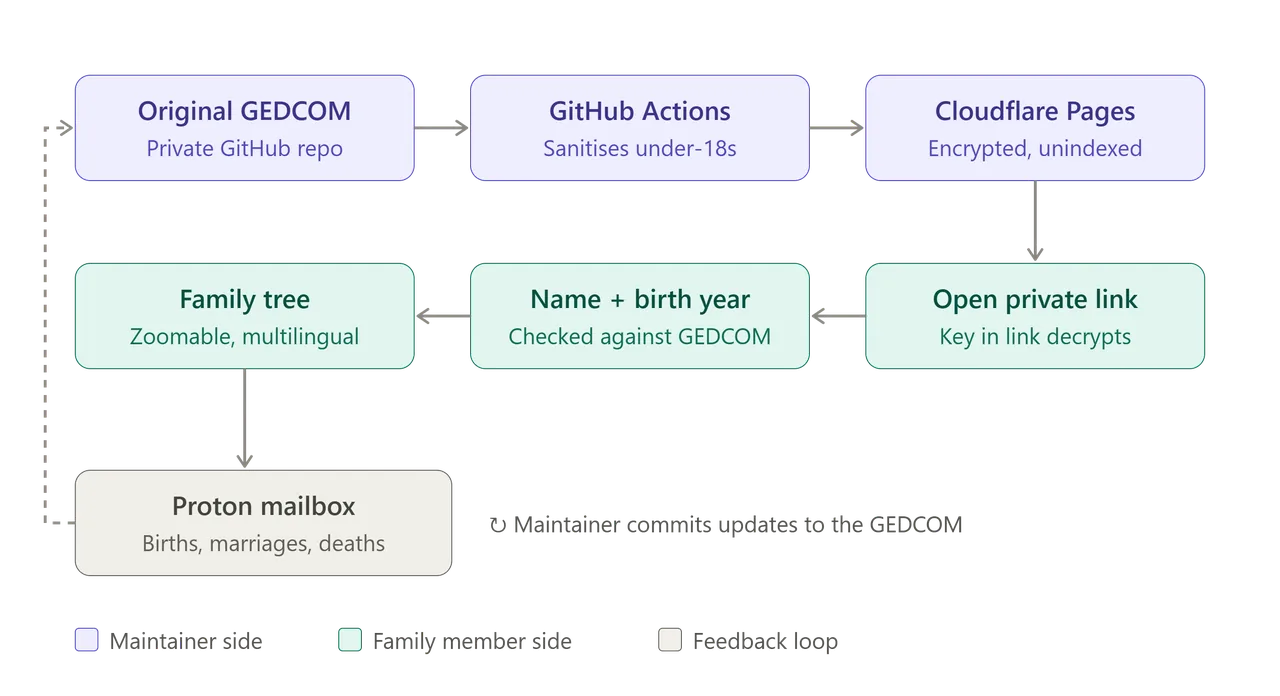
- The family tree is encrypted, and the user's browser decrypts it using a decryption key contained within the link. If anyone stumbles across the main website, they cannot view the family tree. The site is also not indexed anywhere. You must have the full link in order to access it. Of course, users can still share the link, but they are instructed not to send it to anyone they do not trust. This is the "something you have".
- You must also verify your name and your birth year to access the page. If you're a family member, you're on the tree, then it's just a simple GEDCOM lookup to match you against a person.
Security is based on security through obscurity, which is a tradeoff. I accepted that tradeoff because the aim was to keep the system simple and maintainable. The private link prevents casual access, while the name and birth year check provides an additional verification step.
There is also a separate process for protecting information about minors. Living relatives are displayed, but anyone under the age of 18 is removed from the version of the GEDCOM file used by the website.
A GitHub Actions job runs whenever the source data is committed. It takes a copy of the original GEDCOM file, identifies anyone under the age of 18, and replaces their personal data with placeholders. This sanitised version is then the file displayed by the website. The original GEDCOM, which remains the source of truth, is kept securely in the private GitHub repository and is never exposed through the website.
For reporting new events, such as births, marriages, and deaths, I set up a dedicated Proton account. This allows people to contact me without exposing my actual email address.
The overall architecture looked like this:
Results
The research part took me a little over a month and was very time consuming. It was pretty much the only thing taking up my time during that period. It was also extremely rewarding. You discover people who lived hundreds of years ago, people who are only distantly related to you, or people you could have walked past on the street without ever knowing you were related.
It was a little bit like whack-a-mole. Once you found one person, their parents, siblings, children and other relatives would start forming a bigger picture. Then you would follow one of those people and find another branch to investigate. Towards the end of the research, I had identified the three or four most relevant books containing substantial amounts of family history. I resized and batch-uploaded them to Claude, along with my GEDCOM file, so it could review the material and match it against the existing tree. I then manually reviewed each new finding before adding it to the tree. However, this only became practical once most of the research was already complete, as I needed a comprehensive family tree and source collection to properly assess and validate the new information.
I hit multiple walls along the way because records were missing or simply didn't exist. At some point, there was nothing more I could do with the available records, and it was time to stop.
Altogether, I managed to identify just under a thousand people, over 250 families with the earliest record taking the tree back to 1699. At that point, I had simply run out of records to follow. It was fascinating to watch the tree being built out from what initially started as a relatively small number of people. I have also established contact with multiple relatives I never knew existed before, and who, in many cases, didn't know I existed either. That was probably the most unexpected outcome of the whole project.
The research started with trying to understand where my family came from, but it ended with me actually finding parts of the family that were still out there, spread across the world.
Also, if you're a family member who found this through the tree: Hi!